
Meet the Macros
Author: Andrew Porter
Published: 11/5/2026
-
Macropads are now in the 315Concepts store - small, programmable USB keypads for the shortcuts you hit a hundred times a day. Copy, paste, approve, dictate, and whatever else your workflow is asking for.
The Issue
Count how many times today you hit Ctrl+C and Ctrl+V. Go ahead, we’ll wait. If you work anywhere near code, logs, tickets, or an AI assistant, the answer is a number you would rather not know. Copy the stack trace, paste it into the prompt. Copy the suggested fix, paste it into the file. Copy the error from the next run, paste it back in. Your hands are doing the work of a very small, very repetitive robot.
Our Take
The way we work has shifted. A lot of the day is now a conversation loop - ask, read, approve, redirect, repeat - and the keyboard has quietly become a transfer station between windows: context goes into the model, output comes back out, and you are the courier. It’s not hard, it’s just constant. And “constant and not hard” is exactly the category of thing a physical button is good at.
At 315Concepts we like boring hardware that does one job well, and a macropad is about as honest as hardware gets: a few keys, a USB cable, and the freedom to decide what each key means. No cloud, no account, no subscription. You press a thing, a thing happens.
What’s a Macropad?
A tiny keyboard with a handful of keys that you program yourself. Out of the box a pad like our 3-key defaults to Copy and Paste - plug it in and it’s already earning its desk space. When you want more, the included programming software (Windows and Mac) lets you reassign any key to a shortcut, Cut, Undo, Redo, Select All, media controls, custom scripts, and more. Some pads add a rotary knob, which is a natural fit for volume, scrolling, or anything else you’d like to roll, turn, or scroll, instead of click.
A few ways people put them to work, particularly if your day involves an AI pair-programmer:
- Copy / Paste / Paste-and-Enter: The classic, and still the best one. Shuttle logs, diffs, and error messages between your terminal, editor, and chat window without your hand leaving the mouse.
- Approve / Reject: When the agent asks “proceed?” for the fortieth time, give “yes” its own key. Keep the thinking for the code review.
- Push-to-talk: Bind your dictation tool’s hotkey to a physical, satisfying button.
- Undo / Redo: For the moments the agent got a little too creative.
- Mute, volume, window switching: Not everything has to be about the robots. The knob models are great for this.
None of that is required, of course. If all you ever want is a dedicated copy-and-paste pad that makes your wrist a little happier, that’s a perfectly respectable use of $15.
Meet the Macros
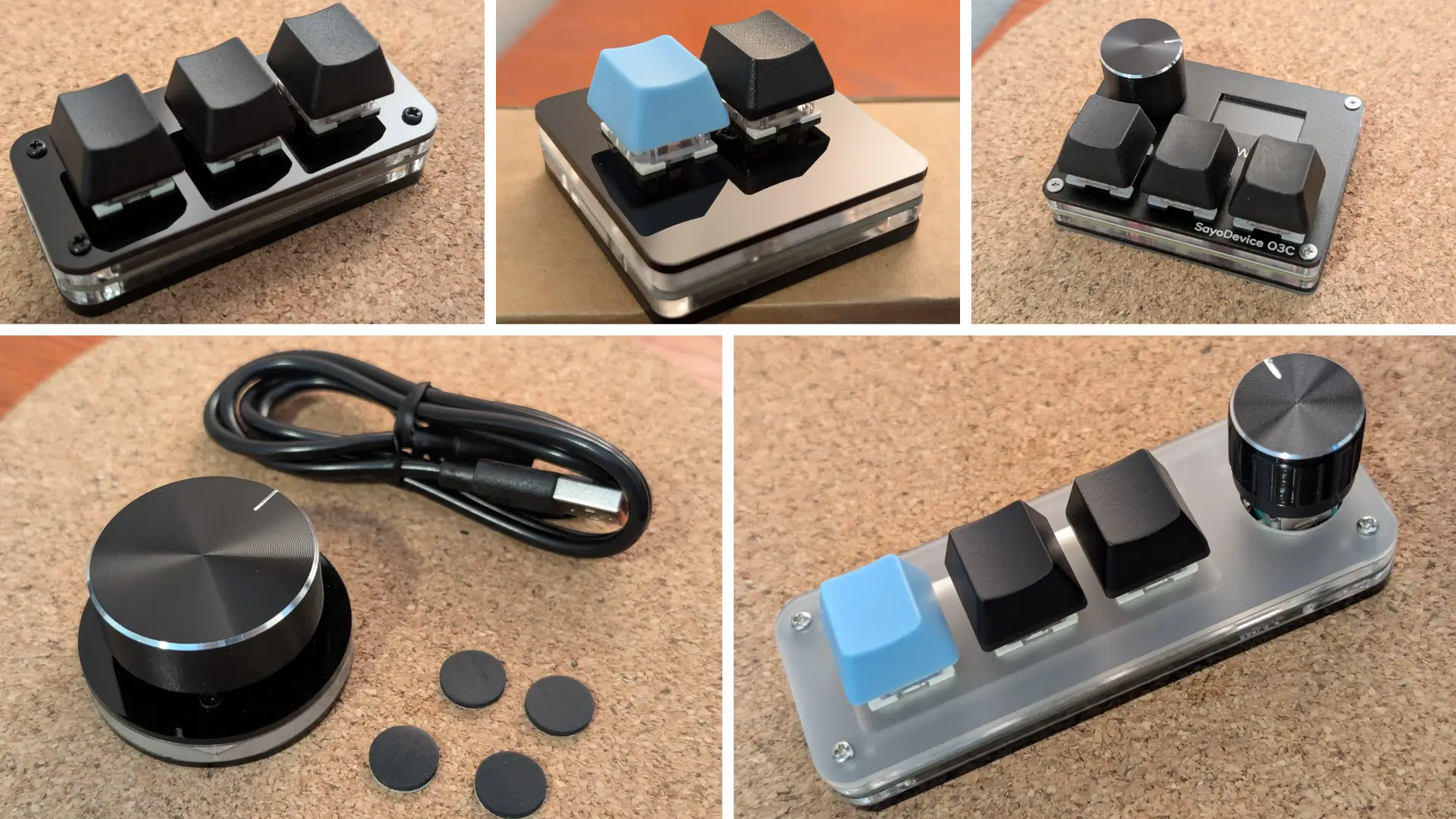
We’re launching today with five devices - all USB, all in stock, and all shipping from our own inventory. There are hundreds of macropads with different layouts, configurations, connections, quality, quirks, and manufacturers - but here’s what we’ve decided to carry:
| Part | What it is | Price |
|---|---|---|
| 3-Key Macropad | Compact 3-key pad that defaults to Copy and Paste. Our pick if you just want the thing that works. | $15 |
| 2-Key Macropad | Two keys, no knob, nothing extra. Maximum minimalism. | $18 |
| 3-Key + Knob Macropad | Three programmable keys plus a rotary knob. The one for people who want to do more than press. | $20 |
| USB Knob | A 360-degree volume-style knob with RGB lighting. Plug and play, no software needed. | $20 |
| O3C SayoDevice | Hall-effect switches with rapid trigger. Even has a screen and it’s a favorite for rhythm games like OSU. | $45 |
The keyed pads share a lot of DNA: hot-swappable switches (no soldering required to change them), RGB backlighting with seven colors and two modes (gradient or press-to-light), and a USB-C connection. The O3C steps that up with its Hall-effect switches and rapid trigger for ultra-fast, precise actuation. Want a different look for your keys? Keycaps are easily swappable, and we’re big fans of Samuel at MaxKeycap on Etsy for custom sets. We only stock a small selection of his work, so he should be your first stop if our limited options aren’t quite what you’re looking for.
Why We’re Carrying Them
Anyone who has followed the blog knows we like to sell up a ladder: raw parts, dev kits, product kits, and finished retail devices. These are the bottom rung, and we’re happy about that. A macropad is a raw part in the best sense - useful on its own, hackable if you want it to be, and cheap enough that buying a second one for the other desk is not a decision that needs a meeting. They also sit nicely next to what we’ve already put on your desk. CHaaS tells you when an agent needs you, and Clawdmeter shows how much runway you have left. A macropad is the third piece - what your hand does when you respond.
On sourcing, we’d rather be upfront than clever: these are generic imports, but they are not dropshipped. We buy in batches, QA check each unit, and ship it ourselves from US stock. We know what it’s like to get (and replace) broken gear from a drop-shipped webstore clone and we figure our customers deserved a better experience - so that’s what we’re doing.
Honest Limitations
Before you click buy:
- These are raw parts. There is no custom firmware and no support from us for programming or modification. The warranty is minimal, covering defects that are clearly identifiable on receipt. Once a unit is opened and modified or integrated further, claims are off the table. Full details are on each product page.
- Programming needs the vendor software. It’s a separate tool for Windows and Mac, and you’ll want the original USB-C cable (we include) for the job.
- They’re wired. No Bluetooth here; it’s a USB cable on your desk.
- The USB Knob is its own thing. It’s plug and play as a volume control, and it supports shortcut keys with knob presses, but it is not a keypad.
- Mind the details on the O3C. It’s the most specialized pad in the lineup, and it is also the most expensive because of that.
Get One / What’s Next
Macropads are here, today in the 315Concepts webstore. Plug one in, and it’ll be pasting before you finish reading this sentence. Then open the software, give a key a new job, and take back a few hundred keystrokes a day.
That’s not the only thing we’ve got going on, either. We have some more exciting news coming up soon, and it may involve a few of the things you’ve seen on this blog finally meeting each other. We’re not ready to say more yet, but keep an eye on this space.