
Opening Up the MK10
Author: Andrew Porter
Published: 11/12/2026
-
We have a Waveshare MK10 on the bench and an agent at the controls. Here's what the first, strictly hands-off phase of our exploration turned up - and where we're taking it next.
New on the Bench
Last week we put macropads in the store and promised there was more coming. Here’s part of it: we now have a Waveshare MK10 on our bench, and we’re taking it apart - figuratively for now, and literally a little later.
What Is It?
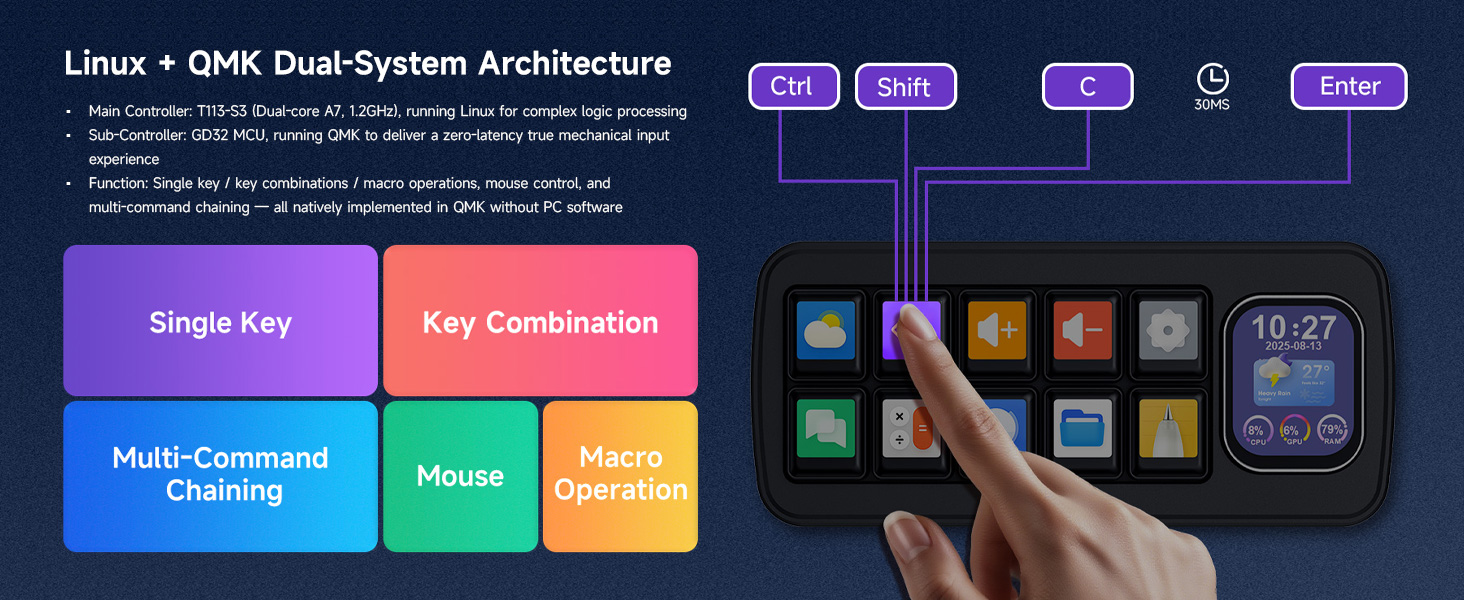
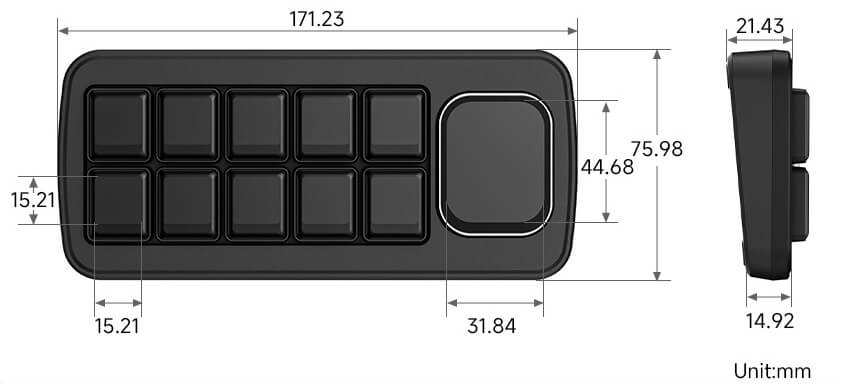
On paper, the MK10 is a macro keyboard with a main screen and a layout of 10 more keyboard keys, each with its own LCD screen. Underneath the macropad facade, though, it’s even more interesting than that. According to Waveshare, there’s an Allwinner T113-S3 running Linux and a GigaDevice GD32 microcontroller running QMK. There’s also a TF card slot, a USB-A port, a Wi-Fi dongle, and a desktop app that drives the whole thing. That’s two processors and a full Linux OS with whatever USB devices you want to plug in - a lot of computer for something that spends most of its life sending Ctrl+C.
Why Bench It?
Because we want to know what it can do, not just what the box says it does. A screen-equipped macropad with a real Linux machine inside sits right where a few things on this blog meet - CHaaS tells you when an agent needs you, Clawdmeter tells you how much runway you have left, and a macropad is what your hand does next. We have some ideas about what that combination could look like, and none of them start with “trust the pre-installed vendor software.” We also want to understand it properly before we recommend it to anyone. If we’re going to put a device on your desk with a Linux box and a Wi-Fi radio inside, we’d like to know what it talks to, what it listens for, and what happens if it goes wrong.
And to be fair, the MK10 hasn’t had the warmest reception so far. Look around the internet and you’ll find a common thread: buyers expected a reliable workflow-companion macropad they could configure once and forget, and instead found that much of the user experience depends on a totally separate app. That app has been called buggy, the instructions often arrive in Chinese, the software itself is an unsigned download from GitHub, and the Wiki is… just a link to that same repo. Some people have spent hours simply getting the buttons to do what they wanted - those are real frustrations, and we’re not going to pretend otherwise.
Our take, though? Almost none of those complaints are about the hardware. And so far the board we have seems… pretty solid. The chips are capable, the USB design is sensible, and the keyboard side runs QMK, which is about as well-trodden as keyboard firmware gets. We (really) like Waveshare - we already build a retail product on one of their boards - and we’re pretty sympathetic here. Shipping polished desktop software for a niche device, in multiple languages, on multiple operating systems, is hard, and it’s usually the first thing to get squeezed when you’re a hardware company selling development kits and prototypes. This series isn’t a takedown of the MK10 - it’s just that a dual-processor board with a full Linux system on it has a lot more horsepower than its software is currently showcasing, and we think there’s (probably) room for something better. So, as usual, we’re just here to see if we can help fix it up a bit.

How We’re Doing This
This exploration is agent-led, with both HuiL (Human in the Loop) and HwiL (Hardware in the Loop) roles. A human operator works with an agent to plan each phase - just like software development with agents, hardware development also starts with setting ground rules and creating a tight deliverables specification that the agent can then adhere to while working. Once the spec is approved, the agent writes an execution chain (scripts, binaries, HuiL instructions) and matching capture tools, plus results parsers - and then executes the phase on a real bench device and writes up the findings.
The operator also sits next to the device to monitor the agent loop and do the things that need hands: pressing keys, swapping cables, and confirming what the screen is doing. When a question can only be answered from somewhere the agent can’t reach, the agent writes a task brief, and a second agent session runs it there and reports back through the operator. The work is split into several of these phases, and they run under a set of ground rules that we take seriously, because we don’t have a device backup yet. Heck, we don’t even know what needs backing up - there’s some real unknown unknowns energy going on for now.
Phase 1: Just Listening
If we break this unit, it stays broken. So Phase 1 had a single rule above all the others: listen, don’t talk. Nothing gets sent to the device, no vendor tools get run, and nothing gets flashed. Every finding is labeled as either observed or inferred, and anything we haven’t verified is written down as an assumption with a confidence level and a plan to check it. Phase 1 was passive host-side recon: plug it in, see what shows up, and record everything it says. Here’s what we found.
Two Devices, One Cable
From inside our Linux VM, the MK10 looked like exactly one thing - an Allwinner USB serial gadget (1d6b:0104) on /dev/ttyACM0. No keyboard at all. And yet… the operator could press “select all” on the MK10 and watch VS Code select everything in that very same VM.
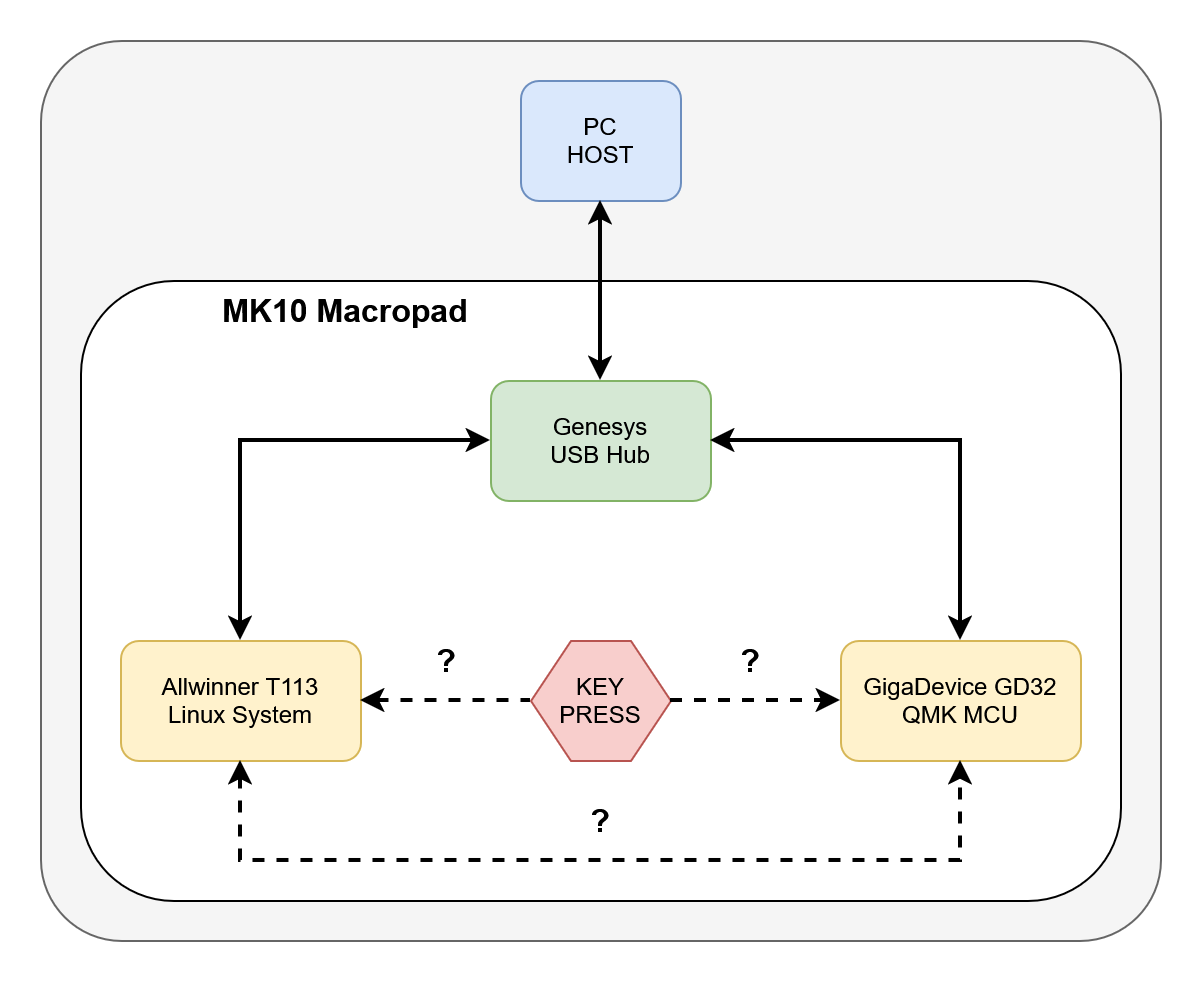
That’s a fun puzzle, and solving it took a trip outside the VM. The agent wrote a read-only brief for the Windows host, and that second session found the answer. The MK10 is really two USB devices behind a Genesys USB 2.0 hub. One is the T113’s serial gadget, and VMware passes that one into the VM. The other is a composite HID keyboard, 4250:426F “syk_keyboards”. VMware keeps that one on the host and quietly forwards its keystrokes into the guest as ordinary key presses.
That keyboard’s four interfaces match QMK’s defaults almost line for line: a boot keyboard, a VIA-style raw HID channel, a shared mouse and media-key interface, and QMK’s debug console. Waveshare said QMK, and the descriptors agree. That’s great news for us, because QMK is open, well documented, and has a huge community behind it - if we ever need to look under the hood on the keyboard side, later in the process, we won’t be starting from scratch.
A Protocol, Not a Console
We were hoping for a shell prompt or a kernel log on that T113 serial port - what we got instead is an application protocol: CRC-checked frames with a fixed AA551234 FIXEDCMDHEAD header, carrying either JSON or a binary, Qt-style list of key events. Most of the chatter is Wi-Fi state, cycling through the same pattern of values every 23 seconds or so. That looks a lot like a connection loop, but the meaning of each state is still a guess.
More interesting are the theme data requests. When you change “pages” (screens), the device asks the host for whatever that page wants to display - date, hour, CPU, GPU and RAM usage - with labels in Chinese. That’s very likely the data path behind the MK10’s hardware-monitor feature, and it’s high on our list for a closer look as the exploration continues. The key events are just as revealing - each key reports its row and column, whether it was pressed or released, and an action like pageSwitch, openPage, or oneLevelUp. So pages and navigation live on the Linux side, and the T113 knows which keys you’re pressing in real time - though how those presses reach it, and how they relate to what the GD32 sends, is still an open question for now.
Keys Take Different Roads
So which chip handles a key press? The answer turned out to be it depends on the key. Our clearest test was simple: press “select all” three times, and capture both USB devices at once. Shortcuts go out as plain HID from the QMK side, and page navigation is handled on the Linux side. What we don’t know yet is which chip decides. Either the GD32 holds its own per-page keymaps, or the T113 tells it what to send over a link we can’t see from USB. Both fit the data, and figuring out which one it is sits near the top of our list of next questions.
Where We Weren’t Passive
We’re dedicated to talking about our soft underbelly, so here it is: our first captures broke our own rule. We read the serial port through the normal Linux terminal layer, which was sitting in a mode where some bytes are treated as line editing commands. It just so happens that most of the device’s Wi-Fi frames are 0x17 bytes long, and 0x17 is the terminal’s “erase word” key. The terminal was deleting the frame headers right out of our capture - and with echo on, it was probably sending the mangled data straight back to the device. ModemManager may also have probed the port with AT commands, since the gadget claims to support them.
The fix was to stop using the terminal at all. The agent wrote a tool that detaches the serial driver and reads the USB endpoint directly, with usbmon logging both buses. From then on, every frame arrived intact - 104 of 104 in the first clean run - and the bus logs show zero bytes sent to the device. The device kept working normally through all of it, but we’ve logged the exposure as an open assumption rather than pretending it didn’t happen.
We also unplugged the Wi-Fi dongle at the end of Phase 1. We don’t know yet whether the device is trying to phone home, and we’d rather not find out by receiving a firmware update on a device that still has no backup.
What’s Still Open
Phase 1 closed with five solid findings and twelve logged assumptions, which is about the ratio you’d expect from just listening. A few of the bigger unknowns:
- Boot. The device runs a roughly 10-second first stage, with rough graphics on the main screen, before the serial port appears. Our VM setup missed the very start of it, so we haven’t seen the device’s first words yet.
- The hidden link. Key events reach the T113 and shortcuts leave the GD32, but neither chip is the other’s USB host. There’s a second link inside, probably UART or SPI, and we haven’t found it.
- The kernel. The gadget reports a device version of
0x0504, which hints at a Linux 5.4 kernel. It’s a hint, not a fact. - The rest of the T113. The chip also has a RISC-V core, NEON ISA support, a Cedrus-exposed VPU, and a HiFi4 DSP. How much of that the stock software actually puts to work and whether we can do any better are both open questions.
Where We’re Headed
Phase 2 moves beyond listening on the serial cable and starts probing the device more directly. First up is the TF card slot - which, it turns out, wasn’t empty - followed by confirming that the hub is really on the board, and hunting for a real boot log. Later phases will dig progressively deeper into its hardware and software capabilities. We’ll write each phase up here as it closes, with the same honesty about what we’ve proven and what we’re still guessing. If you’ve already been poking at an MK10, or if you know what wifiState: 11 means, we’d love to hear from you - find us on GitHub or reach out through our team page.
Want Your Own?
Not from us - yet. We aren’t carrying the MK10 in the 315Concepts webstore just yet, because we’d rather finish kicking the tires before we put one on your desk. If our bench unit doesn’t turn up any major issues as we explore it, we expect to add it to the store, and we’ll say so here when we do. 315Concepts is not affiliated with Waveshare in any way. If you pick one up elsewhere in the meantime and start opening it up, you do so entirely at your own risk - we’re doing it to ours so you don’t have to.